
How to get started with ChatGPT even though you barely know how to turn on your computer

After initially arguing with the internet about whether it was indeed ChatGPT and not ChatGBT, I finally accepted my ignorance and found my way to my first AI system! Before going any further, I took a short breather (image below) as I was not ready to accept that since ChatGPT was launched in 2022, I thought it was ChatGBT. Like with a ‘B’.

Sometimes you just need to take a breather. Good luck finding a paper bag.
I’m Back. What is ChatGPT?
ChatGPT is a generative artificial intelligence (AI) developed by OpenAI. ChatGPT is a chatbot (it said I could call it that) designed to assist with a variety of tasks on a wide range of topics. You may ask it questions and engage in conversations. ChatGPT is designed to respond like an overpaid snooty consultant with no real-world experience, as opposed to the standard and often inane responses you receive from your typical communications company chatbot.
Being a recently unemployed Corporate Moron© who does not know how to do things for myself, a friend suggested I give ChatGPT a try. I thought, “I guess I could use some help with a variety of tasks on a wide range of topics.” So, over the past few weeks, I’ve been learning all about ChatGPT.
What do I ask it?
Having very spectacularly blown up my home computer the other day, I needed to find a new workstation set up. A new workstation seemed as good a place as any to get started. Once I managed to log into ChatGPT, it just sat there waiting for me to ask it something. I was at a complete loss as to what to type, but having watched Terminator and the Matrix, I knew enough to leave out the part about blowing up my last computer (I didn’t want ChatGPT, to think I might be coming for it too).
After 5 short hours of googling and watching YouTube videos to understand what the hell I should ask ChatGPT, I typed my very first query!
What was I doing for 5 hours?
Early on in my quest to select an appropriate question, I discerned that it was important for ChatGPT to know who was asking the question so that it would respond in a comparable tone.
Some self-reflection was in order.
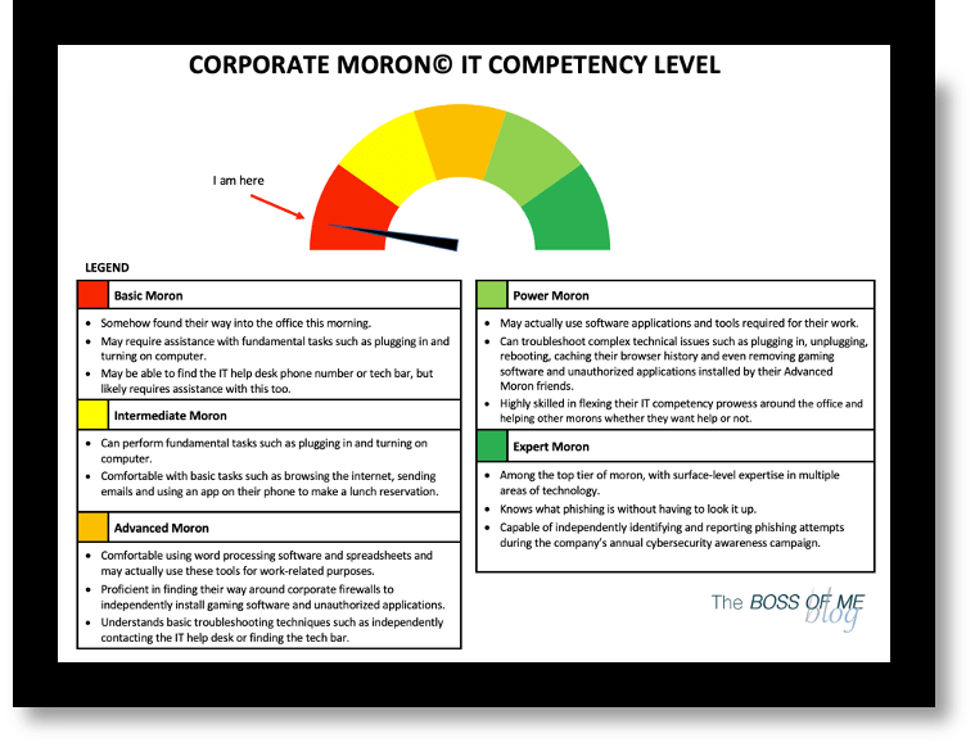
Having spent the last 25 or so years working in an office environment did not prepare me to do IT stuff on my own. On the Corporate Moron© IT Competency Level chart below, I’m a Basic Moron. I’m right between ‘Ma’am is your computer plugged in’ and ‘Have you turned it on?’ list of questions an IT Service Desk agent typically asks.
So, yeah. I needed to spend a few hours learning how to turn my computer on all by myself, and not immediately blowing it up before I moved on to asking ChatGPT for help selecting a cost-effective workstation setup.
Know your limit and stay within it
Having spent several hours better understanding my limits, I decided to understand ChatGPTs too.
I discovered that the primary limitations of the free version of ChatGPT are that its data is from September 2021, and it does not access the internet. The OpenAI website also states that ChatGPT responses may sound right but be wrong and that it doesn’t know everything. “Hmmm,” I thought, “It seems like me and ChatGPT have an awful lot in common.” Ultimately, ChatGPT can make stuff up and make mistakes and any important information you planned to use to make critical life decisions would require review.
With my limited knowledge and outdated 2013 MacBook I planned to use as part of my workstation setup, I wasn’t too concerned with how current or accurate ChatGPT’s information was. Surely ChatGPT would know more than me!
With our limitations well understood, I was ready to get started with my very first query!
What I ended up asking ChatGPT
Also referred to as a ‘prompt’ in the generative AI circles I am now running with, I believed I had compiled enough information to provide a smart inquiry to ChatGPT to elicit an even smarter response.
I was wrong.
I will not bore you with the details (despite this being one of my many talents), however, after an exhausting back-and-forth exchange of technical components and specifications I expect to be more commonly discussed while designing NASA space mission tools, I asked ChatGPT if I needed an adapter to hook up a monitor to my laptop.
ChatGPT told me I did, but I knew this must be wrong. I was incredulous in my response to ChatGPT, I was all like “My MacBook Pro has 2 Thunderbolt 2 ports, 2 USB 3 ports and an HDMI port! What do you mean I need an adapter? What the hell are all these holes for?”
“Apologies for the oversight,” ChatGPT responded, immediately diffusing my frustration with its politeness and making me feel like an asshole. In its’ super polite and very wordy way, ChatGPT advised that the HDMI port on my MacBook would do the trick.
What happened next and what I’m going to do differently next time
Despite both ChatGPT and me spewing outdated, often incorrect, and unhelpful information back and forth in the tone of overpaid snooty consultants and me with the comprehension level of a 5-year-old (which is probably an insult to most 5-year-olds), I consider my first experience leveraging AI to help make a decision a success!
To avoid the excessive back-and-forth next time, I know to ask ChatGPT to respond like it is speaking to an almost 50-year-old Corporate Moron© who doesn’t know how to do IT stuff in the tone of an IT help desk professional with a minimum of 10 years of experience.
Disclaimer
I don’t know what I am doing most of the time. While this article may contain helpful information, I, like my new friend ChatGPT, may be mistaken about the information we provide. If you are using this information for any purpose other than entertainment, we strongly suggest you find a more reliable source.


 The BOSS OF ME blog
Leave a reply to buchabr44 Cancel reply